
Reset Sensibo Thermostat
If your cabin has a heat pump, it is driven by a Sensibo Universal A/C Remote (i.e. "thermostat") on the wall. That thermostat has a code used to communicate with the A/C head unit, and it must be set to 0000.
Why it has to be 0000
The code in the lower right portion of the thermostat must be set to 0000 to communicate with the heat unit. Sometimes guests can accidentally change it and it breaks the communication. Here is how to get it back to 0000:
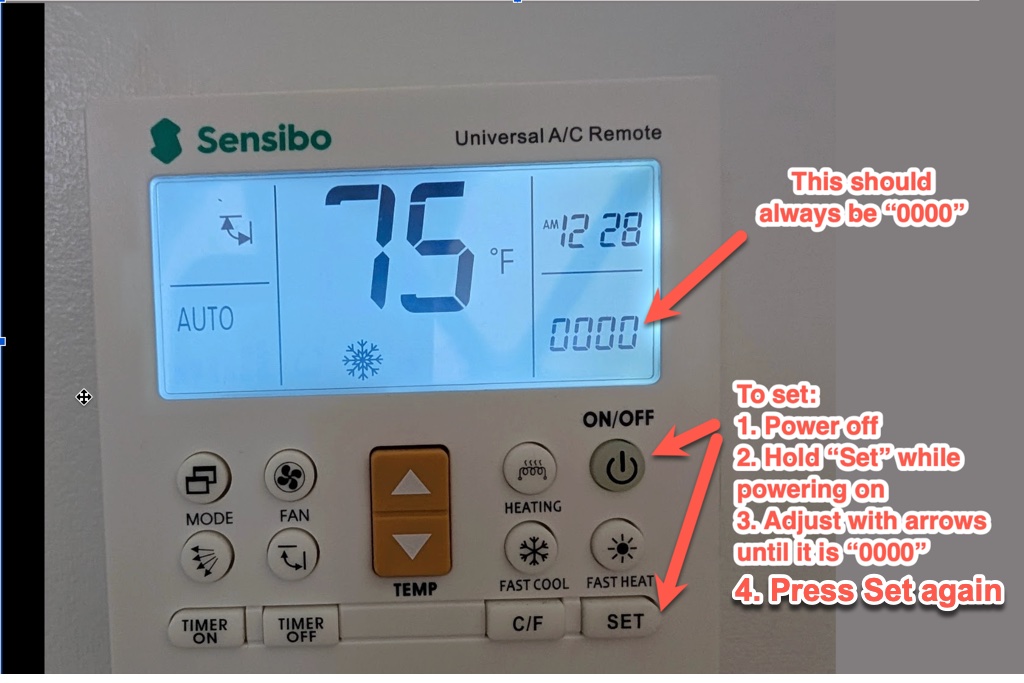
Setting it back to 0000
Power the remote off with the ON/OFF button.
Hold down SET while you power it back on.
Use the up and down arrows until the display reads
0000.Press SET again to save it.
The four zeros should stay on screen next to the clock. That is the whole job — the remote and the heat pump are talking to each other properly again.
If it keeps happening
One reset should hold. If the same remote loses its 0000 again afterwards, that is a fault rather than a bump — please tell us which site it is instead of resetting it over and over.
Didn't find it? Call (207) 250-2560 or email stay@desertofmaine.com.